Testimonial widget for Wix
Place a testimonial widget on a Wix page with the editor's Embed HTML element.
Free to build. You need a free ReTestimonial account to get the code.
Build your widgetLoading the builder…
Builder not showing? Open it on ReTestimonial
This is the carousel layout. See all six layouts
Add it to Wix
Steps last checked on 3 October 2026.
- 1Build your widget above, create the free account and copy the snippet.
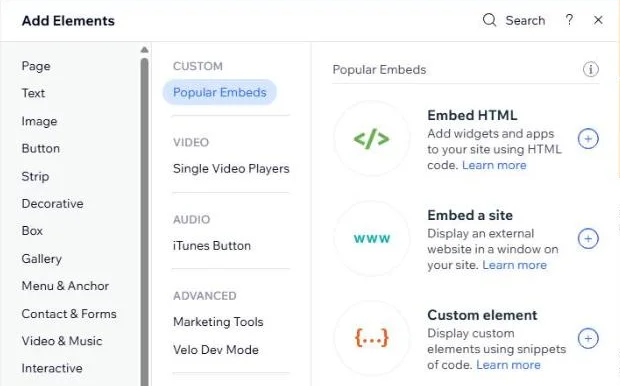
- 2In the Wix Editor, click Add Elements, then Embed Code, then Popular Embeds, and choose Embed HTML.
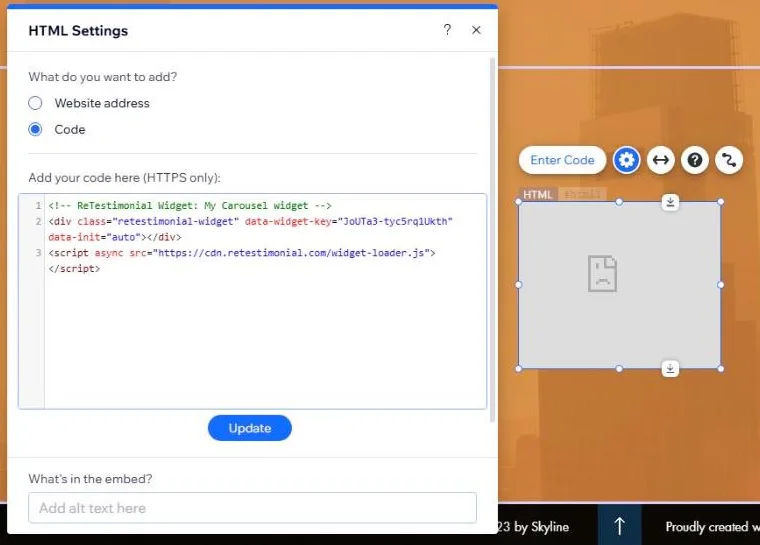
- 3The HTML Settings panel opens. Leave Code selected and paste the snippet under “Add your code here”, then click Update.
- 4Make the element big enough for the whole widget: click the Stretch icon and turn on “Stretch to full width”, then drag the element's bottom edge down until nothing is cut off.
- 5Click Preview to check it, then publish the site.
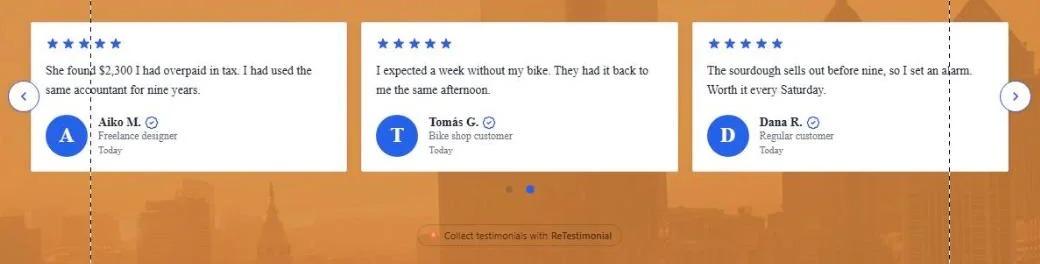
What to expect
- Wix shows embedded code inside a frame with a fixed size, and the widget cannot make that frame bigger. At the size Wix first gives the element, the widget is cut off and gets a scroll bar.
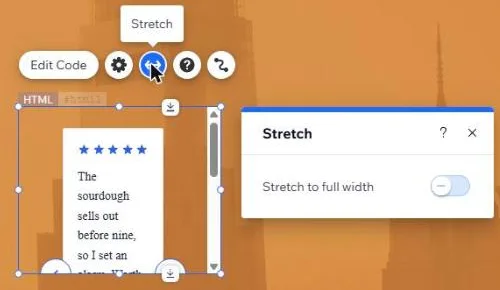
- The mobile version of the page has its own frame size. In the test it showed only a sliver of the widget. Open the mobile editor and make the element taller there too.

- Inside the frame the widget does not pick up your site's font. In the test it showed in the browser's plain serif font. Choose a font in the widget's own design settings if that matters.
- For the same reason, a widget that floats over the page, such as a pop-up, stays inside its frame on Wix.
- In Wix Studio the path is Add Elements, then Embed & Social, then Embed Code. That editor was not tried.
How these steps were checked
Tried in the Wix Editor on a free Wix site: the widget showed in Preview once the element had been stretched and made taller.
- Wix Help Center: Embedding a Site or a Widget
- Wix Help Center: Studio Editor, Adding an HTML iFrame Element
- Wix Help Center: HTML Code on Mobile
Website builders rename things. If a label here no longer matches what you see, tell us.
Other website builders
Are your reviews on Google? Add Google reviews to Wix