Testimonial widget for Webflow
Drop a testimonial widget into a Webflow layout with a Code Embed element.
Free to build. You need a free ReTestimonial account to get the code.
Build your widgetLoading the builder…
Builder not showing? Open it on ReTestimonial
This is the carousel layout. See all six layouts
Before you start
What Webflow asks for.
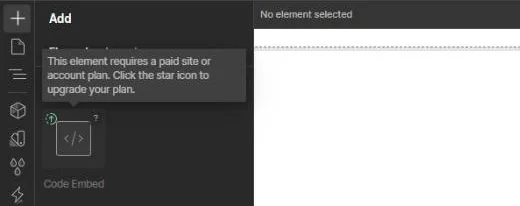
- The Code Embed element needs a paid Site plan on the site, or a Core, Growth, Agency or Freelancer Workspace. On a free Starter workspace the Designer shows the element as locked.
Add it to Webflow
Steps last checked on 3 October 2026.
- 1Build your widget above, create the free account and copy the snippet.
- 2In the Designer, open the Add panel and add a Code Embed element to the canvas where the widget should appear.
- 3Paste the snippet into the code editor.
- 4Save and close the editor.
- 5Publish the site.
What to expect
- The Designer shows a placeholder where a script will run. The widget itself appears on the published site.
How these steps were checked
Checked against Webflow's own help pages. A free Starter workspace showed the Code Embed element as locked, so the steps after that could not be tried.
Website builders rename things. If a label here no longer matches what you see, tell us.