Testimonial widget for WordPress
Add a testimonial slider, carousel or wall to any WordPress page or post without installing a plugin.
Free to build. You need a free ReTestimonial account to get the code.
Build your widgetLoading the builder…
Builder not showing? Open it on ReTestimonial
This is the carousel layout. See all six layouts
Before you start
What WordPress asks for.
- On a site you host yourself, you need to be an Administrator or an Editor. On a multisite network, only a Super Admin can do it. WordPress removes the script from the snippet when anyone else saves the page.
- On WordPress.com, you need a paid plan with hosting features switched on. WordPress.com says installing any one plugin switches them on. Until then it removes the script, so paste the snippet again afterwards.
Add it to WordPress
Steps last checked on 3 October 2026.
- 1Build your widget above, create the free account and copy the snippet.
- 2Open the page or post in the editor.
- 3Click the Block Inserter (+) where the widget should appear and add a Custom HTML block. Typing /html in a new paragraph does the same.
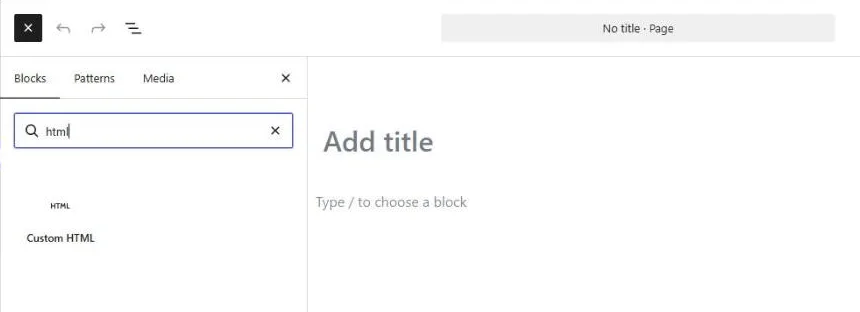
- 4Click Edit HTML and paste the whole snippet into the HTML tab. The script line belongs there too, not under JavaScript.
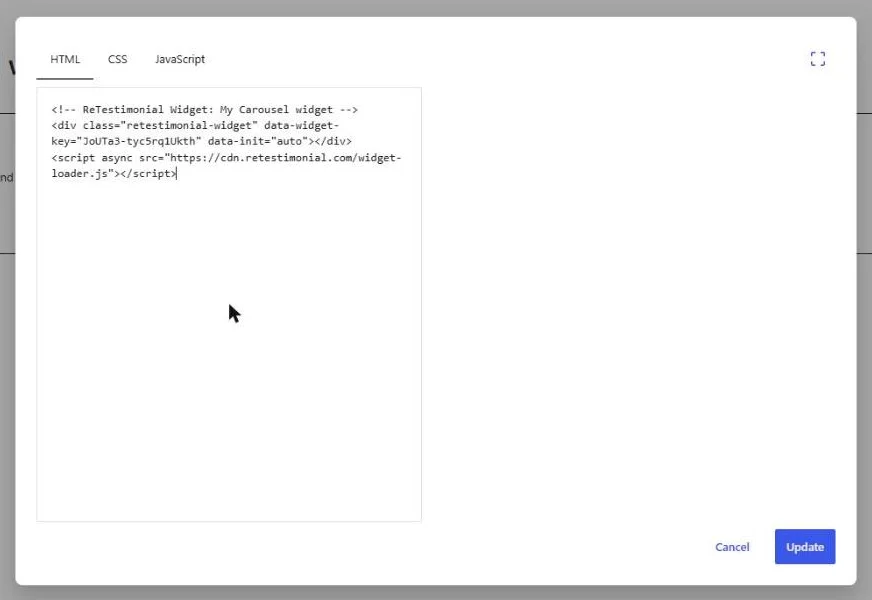
- 5Click Update, then save or publish the page as usual.

What to expect
- The editor shows an empty block where the widget will be. The widget appears on the page itself: use Preview, or open the published page.
- The test site ran a caching plugin, and the widget still loaded for a visitor who was not logged in. If your plugin is set to hold scripts back until the visitor scrolls or taps, the widget will appear at that moment.
How these steps were checked
Tried on a live, self-hosted WordPress 7.1 site: the widget showed on the published page to a visitor who was not logged in. WordPress.com was not tried; what it requires is from its help pages.
Website builders rename things. If a label here no longer matches what you see, tell us.
Other website builders
Are your reviews on Google? Add Google reviews to WordPress